A habit tracker that only collects ticks gives you nothing back, which makes it easy to stop using. Here is what a tracker needs to show you, and how groovmint does it in Notion.
Your Notion habit tracker looked great on day one. By week two, the ticks all look the same and opening it feels like paperwork. That slow fade is tracking fatigue, and it tends to happen when data goes in but nothing useful comes out.
A tracker keeps its place in your day when it shows you three things: your pattern, the effort behind each tick, and how you felt. This post covers each one, and how the groovmint template for Notion handles it. groovmint is a momentum-scoring dashboard. A Groov is a project or interest group you track, such as Fitness, Study, or Work, and its Groov Momentum Score builds from the Habits, Tasks, and Learnings you log.
The flat-list fatigue: why checkboxes don't build consistency
A checkbox records one fact: done, or not done. Weeks of it become a long run of rows that all say the same thing, and a list can't show you how this week compares with last week. Without that comparison, the only reason left to keep logging is willpower.
What helps is a picture. A month laid out as a grid, with filled days and empty days, shows your pattern at a glance. A previous month beside it shows whether you are building or easing off, and a run of filled days is a small reward in itself.
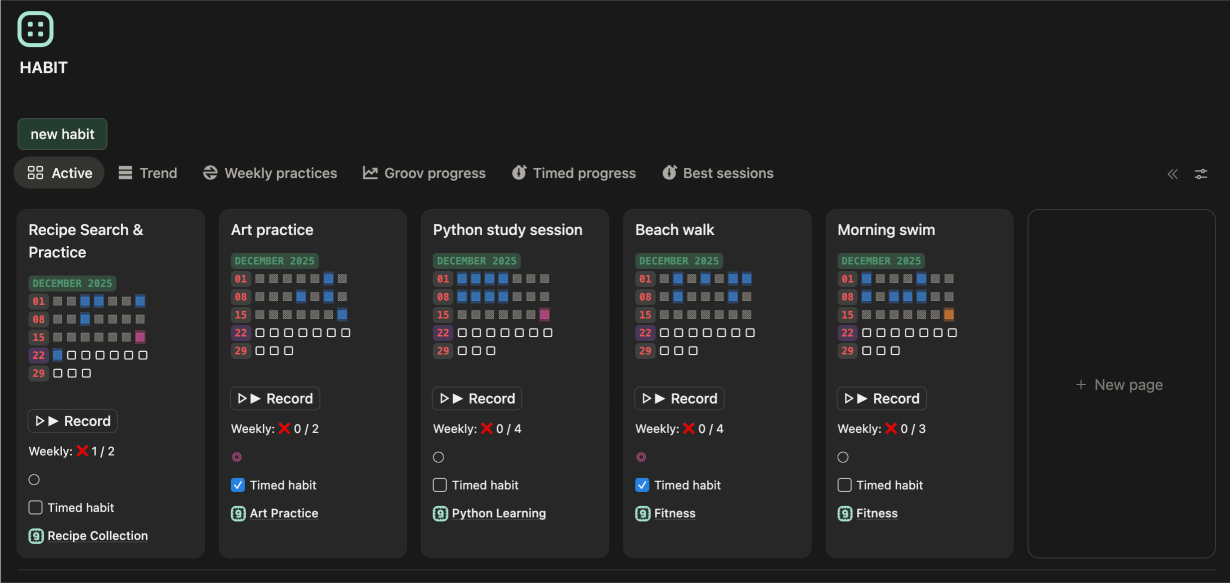
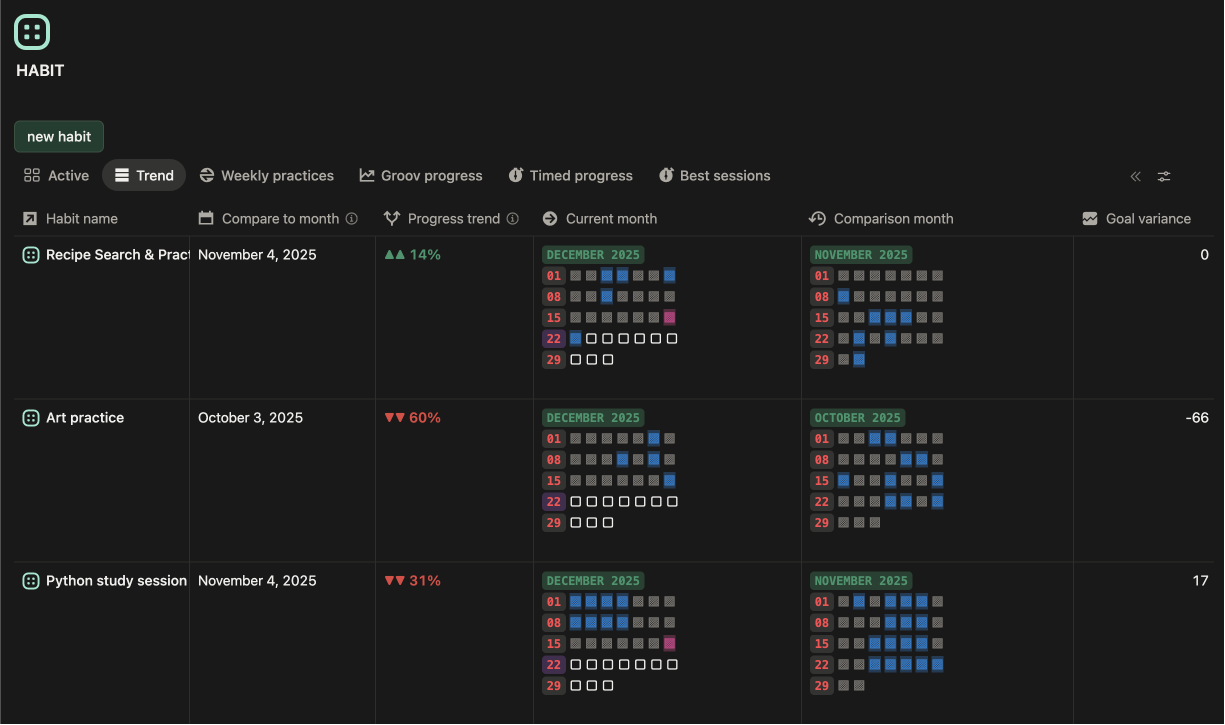
That is the job of the heat map on every Habit card in groovmint. Filled squares are days you logged, empty squares are days with no activity, and the colour gets stronger on days you logged more than once. The Habit page places a previous month beside the current one, with a progress trend that shows up, down, or steady. Gaps stay plain empty squares with no judgement attached, because a quiet week is part of the pattern.
Each Habit you log adds 1.5 points to its Groov's Momentum Score, the highest of any activity type in groovmint.
The binary bias: moving beyond simple yes or no routine goals
A checkbox treats every log the same. Say your habit is reading books. On Monday you read for five minutes before bed. On Saturday you read for two hours. The grid shows one tick on both days, and the difference in effort disappears.
Both days deserve a tick. A tracker also needs to capture how long each one took, so your effort can build into something you can see over weeks.
That is what timed habits do in groovmint. Switch on Timed habit, press RECORD to start the timer, and press it again to stop. The duration is logged for you, and the Habit page shows your total and average time.
One thing to know: a timed habit still counts as one log for Momentum, so the five-minute read and the two-hour read both earn 1.5 points. Momentum measures showing up, and the time is there for your own insight. For more detail, Sessions record what you did once you got there, such as the pages you read or the distance you ran. Sessions stay out of Momentum too, which keeps the score fair across every kind of habit.
Routine goals set how often you want to show up, such as four times a week. When a schedule depends on the calendar, like skipping weekends or flagging a holiday clash, recurring Tasks in groovmint handle it. Our post on building recurring tasks for real-world schedules in Notion explains the calendar logic behind it.
The missing metric: tracking what you did versus how you felt
Most trackers record output. A week of full ticks could be a great week, or a week of running on empty, and the grid looks identical either way.
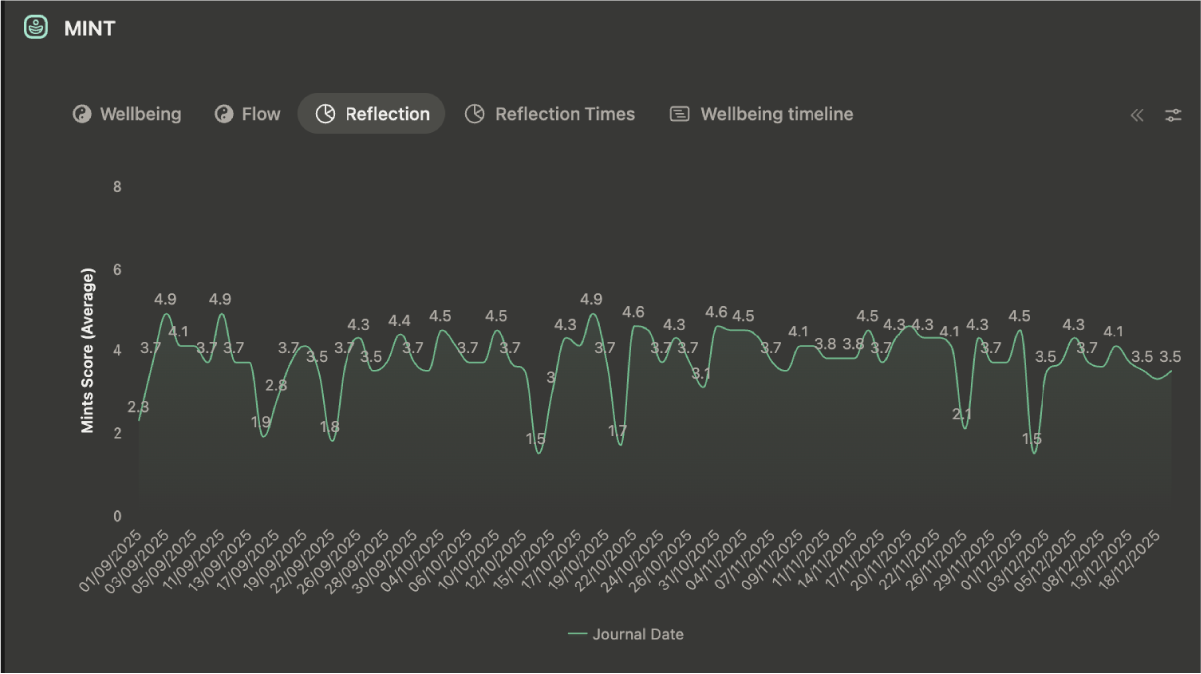
A tracker needs the other half: how you felt while you did it. Set that beside what you did and patterns appear. A high-output day with a low wellbeing score tells you that you were pushing through. A quiet day with a high score might mean you rested well. Each reading is information about that day.
The Insights Journal does this in groovmint. Momentum tells you what you did, and the Insights Journal tells you how you felt doing it. Three short dropdowns (Mood, Feeling, and Energy) become a Mint Score, and journal entries don't add to Momentum, so the two measures stay separate. The Groovmint (Best) chart view then shows your best ever Momentum day and how your wellbeing compared on it. Over time, you can see which moods go with your best work and when in the day you feel your best.
The aim is an honest picture of your patterns, so a truthful log is worth more than an optimistic one.
A ready-made Notion habit tracker with feedback built in
A tracker that gives something back is easier to keep using: a pattern you can see, the time behind each tick, and how the days felt. You could build that yourself in Notion, with two databases, a calendar view for each habit, filtered views for your minutes, a chart, and a formula, plus the work of linking each log to its day. Or you can start with a template that has it connected...
The free groovtrain template is the habit part on its own: heat map habit tracking, timed habits, month comparison, and routine goals. The groovmint template ($55 USD) is the whole system and adds the Insights Journal, Mint Score, and the habit session log. Both work on free and paid Notion plans, and both are releasing soon, so you can subscribe for updates.
To see how a Habit card works, the Habits page in the user guide walks through it.
Have a groovy day!
groovmint, groovdo and groovtrain are templates designed for Notion by Saltwater Assembly Pty Ltd. Notion is a trademark of Notion Labs, Inc.